Security Check your AD & Entra ID (AAD)
- danielweis
- Mar 11
- 5 min read

I'm often asked by IT folk, sysadmins, soc staff, and pentesters alike about some free tools they can run across their environments (or their clients) to identify security risks associated with Local Active Directory (LAD) & Entra ID (Formerly AAD). There are a stack of tools out there, but this blog post will cover some nice simple toolsets you can use in between your next pentest to make it more difficult for the pentesters during your next pentest and to improve your IAM security posture :)
So lets start with local AD...
Local Active Directory (LAD)
Local AD has for the most part gone the way of the dodo, but we still come across a significant number of Local AD environments and Hybrid environments during pentests, as organisations typically move from LAD to Hybrid, to Cloud Only for IAM.
A tool that only came out recently that I love, is called ADPulse. You can download it here: https://github.com/dievus/ADPulse
Shout out to Joe Helle (The Mayor / @dievus) the author of this awesome tool.
This tool runs about 35 checks against your Local AD and provides an awesome report.
The tool is a breeze, fire it up in your local Kali / Nix distro, install the dependencies and run a one liner:
python ADPulse.py --domain mydomain.local --user dan --password 'P@ssw0rd!' --dc-ip 192.168.1.2
If your linux box is joined to the domain you can omit the dc flag.


As you can see it checks a stack of stuff, and displays all the findings in the console, as well as outputs as html, json or just to the console. In this example I have run it against my test lab domain.


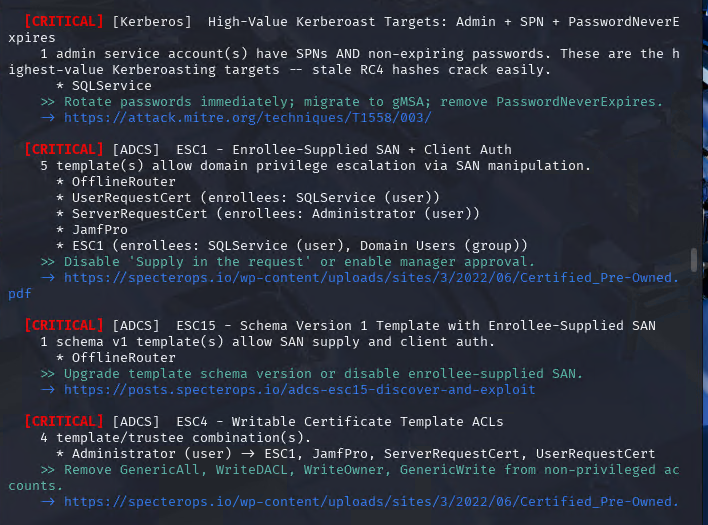


Stacks of findings, but the best bit is the html report, its seriously good, gives you a risk rating, detailed findings and remediation information:


Entra ID (Formerly Azure AD (AAD))
Lets talk Entra, so there are a few tools which are nice. Firstly I'd like to note that my Azure/M365 lab environment uses a P1 license, so some of the features in the toolsets coming up, are missing some data that a P2 license is needed for, such as compliance, logging etc, if you already run a P2 license, then you will obviously get the full output.
Entraid-bench came out a few years back, it basically checks your Entra ID environment against the CIS Microsoft 365 Foundations Benchmark 3.0.0. and gives you a compliance status. It doesn't have a lot of the nicer features and outputs of other tools that are recent, but if you wanted a simple 'am I compliant' type scan, its good for this. You can download it here: https://github.com/alaanasser00/entraid-bench
Note:
For most of the Entra Toolsets, they are typically scripts running in the background, so to get these to work, open an elevated PowerShell prompt, and connect to Entra before running the script(s) or tool. E.g:
Install-Module Microsoft.Graph -Scope CurrentUser
Connect-MgGraph -Scopes "Directory.Read.All", "RoleManagement.Read.Directory"
.\ScriptName.ps1
You will of course be prompted to login and to approve any tenancy access, for example:

If you wanted a good Entra test environment to run these against you can use EntraGoat :)
When you run Entraid-bench (.\entraid_scanner.ps1), it will check a bunch of basic security controls you should have in place, and it does this by prompting you to run different scripts:


And gives you a simple csv file with a compliance status, control and finding:

The next tool I want to show you is one of my favourites, and its called 'Microsoft 365 and Entra ID PowerShell auditing script' and comes from Atlant Security. You can download it here:
It performs over 200+ checks of your tenancy across 37 different realms and gives you a nice detailed html report outlining the findings and remediation activities.
When you run the script, it will do the normal login prompting and display the permissions requested:

It then goes off and does its thing, and displays the issues found as it goes:

It will then finish and also ask you if you want to remediate and/or disconnect from the tenancy:

The report is good value, looks like the below:

And it provides detailed issue description, the reason why the issue was flagged, and the remediation.

Tier0 and 1 accounts
The next item you should be keeping an eye on is Entra Tier 0 and 1 accounts. These are the core privileged roles used by Entra, so they need to be reviewed regularly and ne well secured. If you are not familiar with the Entra Privileged Tier Model, there is a good writeup here from trusted sec:
@PyroTek3 has some useful scripts for auditing Entra Tier0 accounts and App permissions. You can access them in the repo here: GitHub - PyroTek3/EntraID: Collection of Entra ID scripts · GitHub

But hey what about MSGraph!?
The next thing you want to do is audit MSGraph privileges. If you are new to MSGraph, there is a nice breakdown from MS here: https://learn.microsoft.com/en-us/graph/best-practices-graph-permission
Granting excessive Microsoft Graph access (often due to lapses in the principle of least privilege) poses security, operational, and compliance risks. Because MS Graph is the unified API for accessing Microsoft 365 data (e.g Entra ID, Outlook, Teams, OneDrive etc), over-permissioned applications act as "golden keys" for attackers, enabling them to move laterally, escalate privileges, and exfiltrate data.
Morten Mynster is the creator of LeastPrivilegedMSGraph (now up to version 2.0.0) which you can download here: https://www.powershellgallery.com/Packages/LeastPrivilegedMSGraph/2.0.0
And its an awesome tool for analysing MSGraph permissions. I won't reinvent the wheel, he has a simple and awesome writeup here on how to setup your tenancy and use the tool:

The guts of it is pretty simple, make sure you are running a P1 or P2 license, then:
Setup the log analytics workspace in Azure via the marketplace.
Setup Entra diagnostics to log MSGraph Activity
Register the App
Setup Reports
Run Reports
So get cracking and run some checks on your environment (Ensure you test in a lab first or have suitable backups of course :)), and see how your AD, Entra and MSGraph stack up.
To that note, if you are looking for someone to validate your findings and test out all the available privilege escalation and lateral movement paths across these environments that tools alone don't pick up, please reach out! my team are happy to assist!


Comments